Table::make('projects') defines a table. Supply an Eloquent Builder or a closure returning one to query(). The builder is cloned; scopes remain in effect for reads, record lookup, exports, selection and mutations. Only declared, server-visible columns become cells; raw model attributes are not serialized.
Shared defaults and column composition
Register application defaults in a service provider’s boot() method. Each make() factory applies them once, after its complete constructor has run and before the caller’s fluent configuration:
use Spindle\Table\Table;
use Spindle\Table\Columns\TextColumn;

Table::configureUsing(fn (Table $table) => $table
    ->striped()
    ->perPage(25)
    ->pushColumns([TextColumn::make('created_at')->sortable()]));

TextColumn::configureUsing(fn (TextColumn $column) => $column->wrap());

// Keep the shared column and add this table's columns.
$table = Table::make('projects')->query(Project::query())
    ->pushColumns([TextColumn::make('name')->searchable()])
    ->striped(false);
pushColumns() appends columns, column groups, or nested column layouts in order. Appended columns participate in search, sorting, visibility, actions, and summaries normally. Duplicate names, including names nested inside groups/layouts, throw before changing the existing definition. columns() replaces the entire column list, including previously appended defaults; use it when a table needs a different set of columns.
Defaults also work on column, filter, action, group, summarizer, and column-layout classes. Register on a base class to affect its subclasses, or a concrete class to limit the scope. Callbacks run from base class to concrete class, in registration order within each class. Registrations with isImportant: true run in a second pass after ordinary defaults; local fluent calls after make() can still override them. This priority controls defaults, not authorization enforcement.
configureUsing() without a scope returns an idempotent closure that removes only that registration. For temporary defaults, supply during:; its result is returned and the temporary registration is removed even if the scope throws. Nested scopes are supported:
$table = Table::configureUsing(
    fn (Table $table) => $table->perPage(10),
    during: fn () => Table::make('compact')->query(Project::query()),
);
Registrations belong to the Laravel application container and are shared by later factories in that application. Register persistent defaults once at provider boot. For request-dependent values, resolve the current request/user inside the configuration callback rather than capturing a request in a persistent registration. Create fresh column/filter/action objects inside callbacks instead of sharing mutable instances between tables. Existing instances are not retroactively changed. Custom factories should call parent::make() or call configure() once after construction; direct new construction does not apply defaults automatically, and repeat configure() calls are no-ops.
Inertia props
Table implements ProvidesInertiaProperty. Passing it directly produces a native scroll prop, or use the explicit toProp() method:
'projects' => $table,
'projects' => $table->toProp(),
'projects' => $table->toProp()->defer(),
These are alternatives, not three simultaneous props. Native Inertia::optional(fn () => $table->payload()) can be used for non-scrolling custom UIs. To preserve infinite-scroll metadata use toProp() rather than wrapping payload() in Inertia::defer(). With deferred loading, use Inertia’s Deferred component before mounting the table, or conditionally render once the prop exists.
Unrequested table props do not execute their data queries. The prop contains schema and state alongside a data array. Inertia merges only data and matches records on data.id. Search/filter/sort/view changes use only: [prop], reset: [prop], preserveState, preserveScroll, and replacement history.
Pagination
$table->perPage(25, max: 100);
$table->pagination('cursor');      // default: no COUNT or OFFSET
$table->pagination('cursor');      // keyset pagination for very large tables
$table->pagination('simple');      // OFFSET, no total query
$table->pagination('length-aware'); // default: OFFSET plus total query
$table->infiniteScroll();           // scroll to load more instead of page links
$table->paginationPageOptions([10, 25, 50, 'all']); // optional selector choices
$table->defaultPaginationPageOption(25);
$table->extremePaginationLinks();   // First/Last in the non-scrolling UI
Tables use length-aware pagination by default and the Svelte UI shows numbered page links (1 … 4 5 6 … 20) with Previous/Next. Call infiniteScroll() on the table (or pass <Table infinite>) to load further pages as the user scrolls instead; buffer defaults to 500px and manualAfter to 10 pages, after which a Load more button appears. Both directions use Inertia’s native component. Loaded rows accumulate in the table’s data, but once there are more than 60 the prebuilt table only renders those near the viewport (see rendering performance), so long infinite-scroll sessions stay fast.
paginationPageOptions() configures the page-size menu; paginated([10, 25, 50]) is a shorthand. Choices retain their configured order, duplicates are removed, and numeric values above maxPerPage are omitted. The default and current size remain available in the selector. Pass paginationPageOptions([]) to hide that selector. Numeric sizes still accept any integer within the server’s maximum, including sizes restored from saved views.
Include 'all' to let users request the complete filtered result, or set perPage('all') / defaultPaginationPageOption('all') to make it the default. This is an explicit server opt-in: requests for 'all' otherwise fail validation. The headless setPerPage() accepts a number or 'all'. The value persists in URLs, saved views, and enabled session state; changing back to a numeric size resets navigation and resumes pagination/infinite scrolling.
Use paginated(false) to always return every filtered row and hide both page navigation and the size selector. paginated(true) re-enables the configured pagination mode. Unpaginated tables and an active 'all' selection report pagination.mode: 'none', ignore stale page/cursor tokens, and have no next/previous page. Filtering, sorting, actions, tenant scopes, summaries, and aggregate reports still work. For reports, “All” means all matching groups. The native scroll prop remains usable; the prebuilt UI skips the infinite-scroll component when no pagination is needed.
Both 'all' and paginated(false) load the full result into server and browser memory. Use them for small, naturally bounded datasets; keep cursor pagination/infinite scroll for large tables. Unpaginated totals come from the loaded collection, avoiding a separate pagination count query, and page summaries cover the whole filtered result.
extremePaginationLinks() adds First/Last buttons to page navigation when the paginator supplies length-aware metadata. It does not add count queries to simple/cursor pagination, which continue to offer only Previous/Next. Headless renderers can pass pagination.firstPage or pagination.lastPage to controller.goToPage() when non-null.
Cursor ordering adds a primary-key tie breaker. Every cursor sort/group field must be selected, non-null, and supported by Laravel cursor pagination. Laravel does not support bound parameters inside cursor order expressions: for example, a selected relationship sort/group subquery with where('active', true) or a bound orderByRaw() must use pagination('simple') or pagination('length-aware'). Use those modes for nullable values and other unsupported complex expressions too. Both work with native Inertia infinite scrolling; simple pagination avoids the total-count query. Custom sort closures are responsible for valid SQL ordering. A cursor belongs to its current filter and sort; the frontend clears it on changes.
Sorts and grouping override ordering on the base query. Configure initial ordering with defaultSort('created_at', 'desc') and expose that column as sortable. Sort direction and column names are allowlisted; a request cannot name arbitrary SQL columns.
Search
Columns marked searchable() participate in the default global search. searchable(isIndividual: true) additionally enables that column’s own search input. Individual searches combine with the global search and filters. Search state is saved in views and URLs.
Search is fuzzy by default:
- Words, not phrases: every word of the query must appear somewhere in the searchable columns, in any order and in any column. “amelia design” finds Amelia’s design projects, and “design atlas” finds “Atlas redesign”.
- Typos: words of five or more letters also match with one typo, so “custmoer”, “redsign”, “portall” and “systxm” still find their records. Shorter words, and words with digits (amounts, IDs, phone numbers), must match exactly.
- Everywhere: column searches, client-side search, select filter option search and search highlighting follow the same rules.
It needs no database extension: each typo-tolerant word becomes a handful of LIKE patterns (about four per letter) per searched column, and at most eight words are used. That is fine for most tables. For millions of rows or relevance ranking, use Scout or full-text search (below).
$table->fuzzySearch(typos: false); // words in any order, no typo tolerance
$table->fuzzySearch(false);        // the whole query as one phrase in one column
A column’s custom searchable(query: fn (Builder $query, string $search) => ...) is called once per word under fuzzy search (each word must match), without typo variants. Case sensitivity follows Laravel’s whereLike(): case-insensitive, and accent-insensitive where the column’s collation is.
For database-native full-text search or another application-specific search strategy, replace global column searching:
$table->searchUsing(function (Builder $query, string $search, array $state) {
    $query->whereFullText(['name', 'description'], $search);
});
The callback mutates the supplied Eloquent builder. Its conditions are nested so orWhere() cannot escape the table’s base constraints. It receives validated table state as its optional third argument. A table-level callback automatically enables the search input; searchable(false) disables global searching, while individual column searches remain available. searchUsing(null) restores ordinary column searching.
Laravel Scout
Install and configure Laravel Scout, add its Searchable trait to your model, and opt in:
use Laravel\Scout\Builder as ScoutBuilder;

$table->query(Project::where('tenant_id', $tenantId))
    ->scout(
        query: fn (ScoutBuilder $search, array $state) => $search->where('tenant_id', $tenantId),
        maxResults: 1000,
    );
scout() replaces global column searching and enables the input even when no displayed column is searchable. It searches the query model’s index, then intersects returned keys with the original Eloquent query. Tenant scopes, filters, individual searches, summaries, exports, selection, and authorization remain authoritative in SQL. Empty searches skip Scout. Table sorting and grouping determine display order; Scout relevance order is not retained. Native cursor/simple/length-aware pagination and Inertia infinite scroll remain available.
Scout is optional; the package tests against Scout 11. Search callbacks may configure supported index constraints, index names, and soft-delete behavior. Mirror tenant constraints into Scout to avoid spending the result window on inaccessible records. Spindle cannot translate arbitrary SQL filters or global scopes into a remote engine’s query language. When searching trashed records, configure Scout soft-delete indexing and its callback to match the table’s TrashedFilter state. The original Eloquent query still limits the returned rows.
The adapter requests at most maxResults + 1 keys, with a default maxResults of 1000 and an allowed range of 1–10000. If it receives too many matches, it returns Laravel validation under search and asks the user to narrow the search. Configure the engine’s result-window limit to at least this value; an engine that silently caps results below the requested limit can otherwise omit matches. Summaries and “all matching” selection cover the returned key set intersected with SQL constraints. Do not use this adapter to enumerate an unbounded index; use database full-text search or a custom paginated data source for that workload.
Within one request, repeated queries for the same table state reuse the Scout keys, including summaries. A new request searches again, so indexed changes become visible. The database engine returns primary keys; other engines use the model’s Scout key, which must name a database column. Runtime model connection and table settings are retained. External engine outages propagate through Laravel’s normal exception handling rather than returning an unfiltered table. The collection driver loads records into PHP and is unsuitable for large datasets.
Client-side search
For small tables, search can run in the browser instead of the database:
$table->columns([
        TextColumn::make('name')->searchable(),
        TextColumn::make('email')->searchable(isIndividual: true),
    ])
    ->clientSideSearch();
The server then sends every record the filters allow, in one unpaginated response, and never applies the search. Typing narrows the loaded rows instantly, with no requests and no debounce. Filters, sorting and grouping still run on the server. It is opt-in, and because every record must be on the page it cannot be combined with pagination: clientSideSearch() turns pagination off, and re-enabling it (paginated()) throws a LogicException, as do groups-only reports, scout() and searchUsing(). Keep it for tables of up to a few thousand rows.
- Matching: every word must appear, ignoring case and accents. The global search looks in the searchable columns, or in every column when none is marked
searchable(); individual column searches look in their own column. The browser matches the displayed text (formatted numbers, money, dates and list items, untruncated), the raw value and the cell description, so typing what you see finds it. - State: the search stays in the URL state, saved views and history as usual; the frontend mirrors it into the URL without a request. Custom
records()sources receive an emptysearchandcolumnSearch. - Selection: with every record loaded, selecting the visible rows covers everything that matches, so “select all matching” is not offered. Bulk actions receive the selected IDs.
- Server-side results do not see the search: totals and group summaries, exports and queued jobs cover the records the filters allow, not only the rows the search leaves visible. The footer shows “12 of 83 records” while a search narrows the list.
- Headless use:
snapshot.table.dataholds only the matching rows andsnapshot.clientSearchreports{matches, total}.searchRows(table, state, locale)is exported for custom renderers; passlocaletocreateTable()so matching uses the displayed number and date formats.
State
The query parameter projects_state is a JSON object. It includes search, columnSearch, filters, sort, hidden, order, group, groupDirection, perPage, and view. JSON retains empty arrays, false and zero through URL round trips. PHP also accepts a nested input array for form requests. State is validated and server defaults fill omitted keys. Explicit empty filters: {} clears default filters. Table state is bookmarkable and supports browser history; call persistStateInSession('tenant:'.$tenantId) to persist it in the session. Explicit URL state takes precedence, then session state, then the user’s default saved view, then table defaults.
Names must be simple table identifiers. Each table uses its own <name>_state and <name>_cursor / <name>_page parameters. The headless controller preserves unrelated URL parameters.
Grouping and summaries
$table->groups([
    Group::make('status')->label('Status')->collapsible(),
]);
TextColumn::make('amount')->summarize(['sum', 'avg', 'min', 'max', 'count']);
Users group rows by one or several nested levels (the state keeps the outermost in group/groupDirection and the rest in subgroups, a list of {name, direction}, at most three). Rows are ordered by every level, then by the column sorts.
Group pagination (default). When grouped rows are paginated, pages hold groups instead of records, so counts and totals describe the whole table rather than whichever records landed on the page:
- The table prop’s
groupRowslists the page’s top-level groups with their recordcount, group-scopesummaries, rawpathvalues andkey, andpaginationpages through groups with the table’s mode, page size and page name.datastarts empty, andpageSummariescovers the records in the page’s groups. - Expanding a group loads its children through a third optional prop from
toProps(),{name}Group. The request parameter{name}_groupis JSON{"path": [...values], "page": n}. Children are the next level’s groups, or at the deepest level the records ordered by the table’s sorts, paged with the same page size (length-aware). The client merges each page into the table prop, so loaded records work with selection, actions and inline edits like any others. - Call
groupPagination(false)to page records instead and group only the loaded rows. Group pagination also stays off for unpaginated tables and'all', client-side search, custom data sources, card layouts and groups-only reports. - Custom
orderQueryUsing()orders only apply to paged records. Groups that cannot become a grouping query (to-many or nested relationships withoutgroupQueryUsing()), and cursor pagination over nullable group values, raise the same exceptions as aggregate-only reports; usegroupPagination(false)or simple/length-aware pagination for them.
With groupPagination(false), group counts show loaded records, not database-wide counts. Direct belongs-to/has-one groups such as owner.name order automatically, including self-relations and related JSON attributes. The grouping relationship is eager-loaded even when no visible column uses it. JSON groups such as metadata.category and date() groups select their SQL expression under an alias, allowing non-null values to participate in cursor pagination. Use simple or length-aware pagination when a group value or relationship can be null, or when its selected subquery contains bound parameters. Relationship constraints and ordering are preserved; custom raw SQL remains responsible for valid column references when a self-relation is aliased. Group scopes and summaries use the same selected related value: an ordered has-one relation does not count a parent in additional groups just because another child has a different value.
Grouping by a to-many or nested relationship still requires explicit orderQueryUsing(fn (Builder $query, string $direction) => ...) because a record needs one well-defined group value. This callback also overrides automatic ordering for other groups. Use getTitleFromRecordUsing(fn ($record) => ...) for display labels. Set collapsible(false) to keep groups expanded.
Summaries cover the entire filtered query, not only the loaded page. Built-in summaries share one aggregate query per scope, including both ends of a range. Custom using() callbacks execute separately. Avoid unnecessary summaries on high-volume tables. Use objects from Columns\Summarizers for labeled/custom summaries and scopes:
TextColumn::make('amount')->summarize([
    Sum::make()->label('Total')->scopes(['all', 'page', 'group']),
    Range::make(),
    Summarizer::make('weighted')->using(fn (Builder $query, string $column) => ...),
]);
Built-ins are Sum, Average, Min, Max, Count and Range. All support formatStateUsing(). page means the current server page, not all accumulated infinite-scroll pages. Group totals cover all filtered records in each loaded group, not only its loaded rows. A custom group can supply scopeQueryUsing(fn (Builder $query, $record) => ...). Groups support date() for calendar-day grouping with a selected SQL date alias, including cursor pagination for non-null dates. Raw custom order expressions require a selected alias for cursor pagination, or simple pagination. Relationship summary columns require a custom summarizer using() callback that computes the aggregate on the scoped builder. Built-in summaries also accept JSON paths.
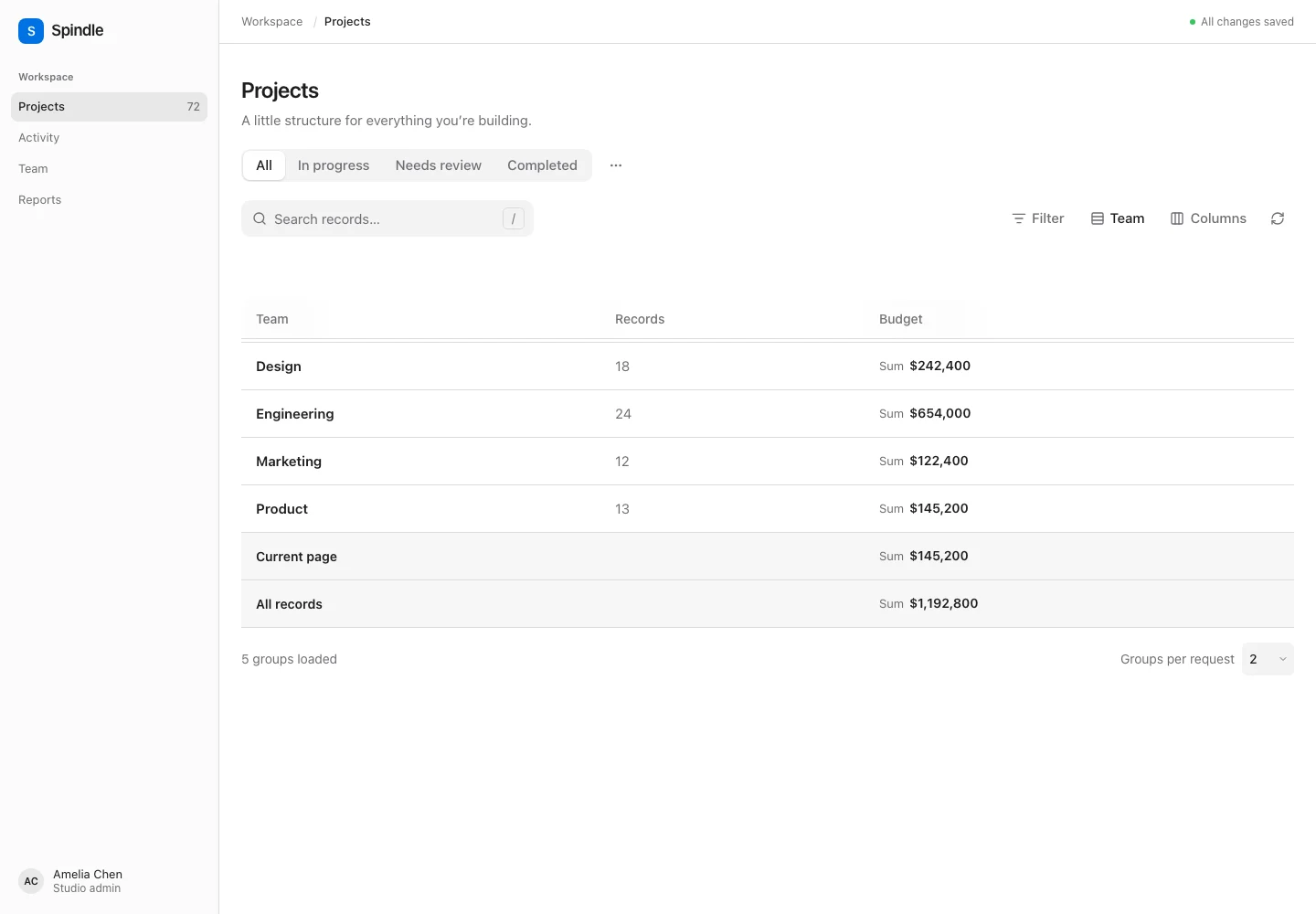
Aggregate-only reports
Use groupsOnly() to return one row per group, containing counts and summaries. Records are aggregated in SQL; the server does not fetch every record to group it in PHP.
use Spindle\Table\Columns\Summarizers\Sum;
use Spindle\Table\Grouping\Group;

$table->groups(['status', Group::make('created_at')->date()])
    ->defaultGroup('status', 'asc')
    ->groupsOnly()
    ->columns([
        TextColumn::make('amount')->summarize([
            Sum::make()->label('Revenue')->scopes(['group', 'all', 'page']),
        ]),
    ]);
defaultGroup() also works with ordinary row tables. It accepts a registered name or a Group object and registers missing names. Without an explicit default, reports use the first registered group. A report always requires a group; requests and saved views cannot set it to null.
Pagination and native infinite scroll operate on groups. perPage limits groups, and length-aware total counts groups. Report rows include group.count for the number of matching records, group.summaries, an opaque stable ID, empty cells, and no selection or row actions. Header actions remain available. Svelte automatically renders the report and exposes GroupSummaries for custom compositions. Column visibility/order, filters, search, group direction and saved views remain available. Record sort state does not change report ordering; reports sort by the grouping value. Columns without group summaries produce empty report cells, but can still provide search/filter metadata.
Built-in group aggregates and counts share one query. Adding all/page summaries adds at most one aggregate query per scope. page covers all matching records in the groups on the current server page; it does not accumulate totals across infinite-scroll requests. Custom summarizers can issue additional queries.
Scalar columns, JSON paths, dates, and direct BelongsTo/HasOne attributes such as owner.name support SQL grouping. Nullable values require pagination('simple') or pagination('length-aware'); Laravel cursor pagination cannot seek through null values. Null, empty string and zero have distinct group identities. Prefer getTitleFromValueUsing(fn ($value) => ...) for labels without extra queries. getTitleFromRecordUsing() remains supported, but fetches one representative record per loaded group.
For a computed grouping, define both SQL grouping and value scoping so page summaries and custom summarizers select the same records:
Group::make('size')
    ->groupQueryUsing(fn (Builder $query, string $alias) => $query
        ->selectRaw('CASE WHEN amount < 1000 THEN 0 ELSE 1 END as '.$alias)
        ->groupBy($alias))
    ->scopeValueUsing(fn (Builder $query, $value) => $query
        ->where('amount', $value ? '>=' : '<', 1000))
    ->getTitleFromValueUsing(fn ($value) => $value ? 'Large' : 'Small');
The alias is supplied by the package. Callbacks receive the already filtered, tenant-scoped query and must retain its constraints. Nested/to-many relationship reports require explicit groupQueryUsing() and scopeValueUsing() callbacks. Report mode requires Eloquent; custom paginator data sources remain responsible for their own aggregation. The mutation endpoint must rebuild the same table definition, including report mode and columns. Use a distinct saved-view scope when two report/record variants have incompatible columns.
Presentation and updates
emptyStateHeading(), emptyStateDescription(), striped(), recordUrl(fn ($record) => ...), and recordClasses(fn ($record) => ...) customize presentation. contentGrid(3) selects the responsive card renderer; it has column-aware cells, selection, actions and mobile stacking. ColumnGroup::make('identity')->columns([...]) produces spanning headers in table mode. Row URLs are explicit accessible links. Only safe URL schemes render. poll(10000) refreshes every ten seconds while the browser document is visible and the controller is idle; refresh resets accumulated scroll rows.
checkIfRecordIsSelectableUsing(fn ($record) => ...) controls selection and is enforced again on the server for bulk actions.
reorderable('position', authorize: fn ($record, $user) => ..., direction: 'asc') adds a Reorder records button. Activating it shows mouse/touch drag handles and keyboard move controls in tables and cards. Direction accepts asc or desc. With no explicit sort, records automatically use this column and direction, followed by the primary key. The position column does not have to be displayed.
Entering reorder mode clears incompatible sorting, grouping, active-view selection and record selection while retaining search, filters and the configured page size. By default it disables pagination and loads the complete filtered result, allowing moves between rows previously on different pages. Done reordering hides the handles and restores the normal pagination policy. Use paginatedWhileReordering() for large datasets to keep bounded native pagination/infinite scrolling; moves then apply to loaded rows. This setting does not override an explicit paginated(false) or an All page-size choice.
Reorder mode is temporary. Its reordering state flag survives a reload of the current URL, but is not stored in saved views or session preferences. Applying a saved/preset view or resetting the table leaves the mode. The server checks table-level reorder authorization before reading an unpaginated reorder request; ordinary per-record checks still run for each mutation. Aggregate reports and remote data sources do not expose reorder mode.
Customize the trigger’s label, color, or visibility with an action callback:
use Spindle\Table\Actions\Action;

$table->reorderRecordsTriggerAction(fn (Action $action, bool $isReordering) => $action
    ->label($isReordering ? 'Finish ordering' : 'Arrange projects')
    ->color('primary'));
This action configures a local mode toggle, not an endpoint action; callback execution, form data, links, and confirmation settings are not used. visible(fn () => false) hides the standard trigger when a custom header supplies its own controller.toggleReordering() button.
The authorization callback receives null for the table-level check and each submitted record before mutation. Submitted records must belong to the current filtered and tenant-scoped query. Reordering retains the subset’s existing positions, leaving unrelated records untouched. Positions must be distinct and non-null. Unique position constraints may need an application-specific reorder action with temporary positions.
$table->reorderable('position', authorize: fn ($record, $user) => $record === null
        ? $user->can('reorderAny', Project::class)
        : $user->can('reorder', $record), direction: 'desc')
    ->beforeReordering(function (array $order, $records): void {
        // Authorized records in the requested order, before their positions change.
    })
    ->afterReordering(function (array $order, $records): void {
        // The same records now contain their new positions.
    });
Both hooks run inside the reorder transaction, after validation and every permission check. A hook exception rolls back the position updates and other database writes made inside the hooks. Use Laravel’s after-commit facilities for work that should happen only after the transaction succeeds.
The prebuilt controls work on loaded records. Drag the grip, use its Up/Down arrow keys, or click the adjacent move buttons. Escape or pointer cancellation cancels a drag. Near the viewport edges, dragging scrolls the page; newly appended infinite-scroll records can become targets. A query change or a replacement/reordering of the original rows cancels an in-progress drag. Each move submits only the changed interval, with at most 1,000 IDs. Two adjacent rows can therefore be moved even if more than 1,000 rows are loaded.
Sorting by another column or enabling grouping disables these controls; Use record order clears sorting/grouping and restores the configured order. The backend rejects reorder requests while incompatible ordering is active. Saved views keep their existing sort/group definitions.
Headless clients enter/leave the mode with controller.toggleReordering(true | false) (omit the argument to toggle). Use controller.moveRecord(id, targetId, 'before' | 'after') in that mode; it returns an action-result promise. The lower-level controller.reorder(ids) submits an authorized subset in its desired order without requiring the presentation mode. controller.useRecordOrder() resets sorting/grouping. Custom Svelte layouts can render the exported ReorderControls with id, bodyId, snapshot, and controller while config.reorderable && config.reorder.mode; the scoped row container should contain elements marked data-spindle-row={row.id}.
Custom data
For external services, arrays, or computed records, implement Contracts\DataSource or pass a closure:
$table->pagination('length-aware')->records(
    function (array $state, Request $request, string $pageName) {
        $result = $api->search(
            query: $state['search'],
            filters: $state['filters'],
            page: max(1, (int) $request->input($pageName, 1)),
            limit: $state['perPage'],
        );
        return new LengthAwarePaginator(
            $result['rows'], $result['total'], $state['perPage'],
            max(1, (int) $request->input($pageName, 1)), ['pageName' => $pageName],
        );
    },
    key: 'id',
);
Providers must apply validated search/filter/sort/group state, enforce tenant access, use the supplied page name, and return at most the numeric perPage records with stable unique keys. The provider state also includes a server-owned pagination mode. When it is 'none' (disabled pagination or an opted-in 'all' size), return the complete result in a first-page LengthAwarePaginator, with total equal to the number of returned items. Spindle rejects a partial paginator in that mode and normalizes its scroll metadata. Only opt into unpaginated remote tables if the source can supply their entire filtered dataset. The package does not fetch extra remote pages automatically. Supply resolveRecordUsing(fn ($id, Request $request) => ...) for row actions on remote data. Built-in inline edits, bulk actions, summaries, reorder and CSV export require Eloquent; implement those in application actions for external sources.
Performance
Default cursor loading uses one bounded query with no count. Relationship columns are eager loaded. The TypeScript core has no runtime dependencies; only Svelte and Inertia are peer dependencies of the renderer. Search waits 250ms and cancels stale navigation. Add database indexes for tenant keys and actual sort/filter patterns. Leading-wildcard search can scan large datasets; use searchUsing() for database-native full-text search or the bounded scout() adapter described above. No benchmark justifies a universal speed claim; measure realistic data in your application.
The frontend reuses up to 64 Intl formatters, avoiding expensive formatter construction for each cell while bounding memory across SSR requests. Run npm run benchmark for a repeatable formatting microbenchmark. A local Node 22 run formatted 10,000 currency cells in about 5–7 ms with caching versus 110–180 ms with repeated formatter construction. This measures only formatting work; SQL, network, rich-text parsing and DOM layout remain application-dependent.