Import classes from Spindle\Table\Columns. Every column starts with make('attribute'). Names can be dotted relationship paths. hidden() removes a column and its values server-side. Showing and hiding columns in the column manager is a table-wide setting (see Column manager); it only controls presentation and must not be used to protect sensitive data.
Common API
| Method | Purpose |
|---|---|
label(string) |
Header text |
sortable(bool = true, ?Closure $query = null) |
Allowlist sorting; optional (Builder, direction) callback |
searchable(bool = true, bool $isIndividual = false, ?Closure $query = null) |
Global/column search; optional (Builder, search) callback |
hiddenByDefault(bool = true) |
Start hidden until the user shows it (when the table’s columns are toggleable) |
hidden(bool = true), visible(bool = true) |
Server-side schema/value visibility |
state(mixed) |
Literal value or fn ($record) => value |
default(mixed), placeholder(string) |
Null state fallback, display-only empty placeholder |
formatStateUsing(Closure) |
fn ($value, $record) => formattedValue |
url(string|Closure), tooltip(string|Closure), color(string|Closure) |
Literal or fn ($record, $value) => ... |
align(string), width(string), wrap(bool = true) |
Cell styling |
columnGroup(string) |
Group label above the header |
with(array) |
Explicit eager loads needed by callbacks |
summarize(string|array) |
sum, avg, min, max, count on the full filtered query |
type(string), meta(array) |
Renderer discriminator and JSON metadata |
Callbacks are explicit positional callbacks, not Filament’s reflection-based utility injection. Formatted strings are escaped by default. Explicit html() and markdown() modes sanitize content on the server before it is rendered. Custom snippets remain responsible for the markup they produce.
Built-in columns
TextColumn: badge(), numeric(), money(), date(), dateTime(), time(), since(), limit(100), copyable(), listWithLineBreaks(), html(), markdown(), code(language: 'php'). Number/date options and date tooltips are described below.
IconColumn: boolean(), trueIcon('✓'), falseIcon('−'). Icons are text glyphs; custom SVG/icon libraries belong in a snippet.
ImageColumn: circular(), size(32), stacked(), overlap(8), limit(3), limitedRemainingText(). An array of URL values renders multiple images; stacked mode overlaps them. Invalid URL schemes are omitted before calculating the remaining count. Values are URLs; use a state callback for storage disk URLs. Images load lazily and have accessible labels. ColorColumn displays a CSS color swatch and its value.
TextInputColumn, SelectColumn, ToggleColumn, CheckboxColumn: editable variants. SelectColumn::options() also validates the value against the option keys. Toggle and checkbox values are validated as booleans. Text input defaults to a nullable string with a 65,535-character limit. Override rules() for application rules.
ToggleColumn::make('is_featured')
    ->authorize(fn ($record, $user) => $user->can('update', $record));

SelectColumn::make('status')
    ->options(['draft' => 'Draft', 'published' => 'Published'])
    ->authorize(fn ($record, $user) => $user->can('update', $record));
Editable columns deny updates until authorize() is configured. Authorization is checked both for rendering and for every submitted edit. Updates occur inside a transaction. updateStateUsing(fn ($record, $validatedValue) => ...) supports domain services and related records; automatic writes to dotted relationship paths are rejected.
Number and date formatting
TextColumn::make('quantity')->numeric(decimalPlaces: 0, locale: 'nb-NO');
TextColumn::make('amount_in_cents')
    ->money('EUR', divideBy: 100, locale: 'de-DE', decimalPlaces: 3);
TextColumn::make('created_at')->dateTime(timezone: 'Europe/Oslo');
TextColumn::make('starts_at')->time('H:i', timezone: 'Europe/Oslo');
TextColumn::make('due_date')->date('Y-m-d');
TextColumn::make('published_at')->locale('fr')->isoDate('D MMMM YYYY');
TextColumn::make('updated_at')->since()->dateTimeTooltip('Y-m-d H:i');
numeric() defaults to two decimal places. money() uses the currency’s normal precision unless decimalPlaces is supplied (for example, JPY normally has none). Precision accepts 0–20; divideBy must be a positive integer and is applied before rounding. Numbers are formatted with JavaScript Intl.NumberFormat, so values are subject to JavaScript number precision. For arbitrary-precision financial values, provide a server-formatted string with formatStateUsing().
locale('en-GB') overrides the frontend table’s locale for that column; locale(null) restores the frontend default. Underscore forms such as nb_NO are normalized. Localized Carbon formats and relative tooltips use the column locale, or Laravel’s application locale if none is set. PHP date tokens keep their normal PHP behavior. Set locale() on the column when both sides must use the same locale.
Without a custom format, date(), dateTime(), and time() use cached browser/SSR Intl formatters. timezone('Europe/Oslo') sets an IANA zone for date-time and time display; it also applies to date tooltips unless their own timezone argument overrides it. UTC is the default. SQL timestamps without offsets are interpreted as UTC, independent of the browser’s time zone. Date-only display preserves the calendar day in the original value and deliberately ignores time-zone conversion. Bare times such as 13:45:00 are anchored to January 1, 1970 UTC; use a full timestamp when seasonal daylight-saving offsets matter.
Supply a PHP date format to date(), dateTime(), or time() for server formatting. isoDate('LL'), isoDateTime('LLL'), and isoTime('LT') use Carbon’s localized macro/token formats. Raw cell values remain available; display output is stored in cell.formatted. An explicit formatStateUsing() callback takes precedence. Null/empty values use the placeholder; unparseable date strings remain visible as text. Arrays are formatted item by item and respect listWithLineBreaks().
Tooltips independently support dateTooltip('M j, Y'), dateTimeTooltip('M j, Y H:i'), timeTooltip('H:i'), their isoDateTooltip('LL'), isoDateTimeTooltip('LLL'), isoTimeTooltip('LT') variants, and sinceTooltip(). Date/time tooltip methods accept a named timezone argument. They read the raw cell state and produce escaped plain text. Calling tooltip() afterward replaces them. Relative tooltips are calculated on the server when the prop is generated; since() display uses the current render time in the headless formatter.
Text presentation
TextColumn::make('name')
    ->description(fn ($record, $value) => $record->team, position: 'above')
    ->prefix('#')->suffix('!')
    ->icon('★')->iconPosition('after')->iconColor('warning')
    ->size('lg')->weight('bold')->fontFamily('mono')
    ->words(6, end: ' (more)');

TextColumn::make('description')->wrap()->lineClamp(2);
TextColumn::make('reference')->limit(24, end: '…');
description() displays escaped text below the value by default, or above it with position: 'above'. Descriptions sit outside the value’s link/action and do not enter its copyable value. description(), prefix(), suffix(), icon() and iconColor() accept a string, null, or a (record, rawValue) callback. Static values live in column metadata; callback results appear in the corresponding optional cell fields. Replacing a callback with a literal or null clears the callback. Neither descriptions nor affixes change raw cell state.
Icons are escaped decorative text glyphs, hidden from screen readers. Choose iconPosition('before'|'after'); the icon inherits the cell color unless iconColor() overrides it. Built-in color names are primary, success, warning, danger, info, and gray. Use a custom column snippet for SVG or an icon library.
Typography accepts size('xs'|'sm'|'md'|'lg'), fontFamily('sans'|'serif'|'mono'), and weight('thin'|'extra-light'|'light'|'normal'|'medium'|'semibold'|'bold'|'extra-bold'|'black'). Weight also accepts 100–900 in increments of 100. Explicit size/weight settings also apply to badges. lineClamp(2) limits rendered lines without altering the complete text; lineClamp(null) removes it. Available width determines wrapping, so give your table/card layout room to constrain the column.
limit(length, end: '…') counts Unicode code points, avoiding broken surrogate pairs. getCharacterLimit() returns the configured limit for use in your own callbacks. words(count, end: '…') counts whitespace-delimited words. Null or zero removes a character/word limit. When both are set, the shorter result wins and uses that limit’s ending; a tie keeps the character-limit ending. Limits apply after number/date/custom formatting and before prefixes/suffixes, independently for each list item. Empty placeholders are not decorated. Highlighted code preserves its token classes through truncation and renders affixes/endings as escaped text.
Rich HTML/Markdown limits run on the server after formatting and sanitization. They count decoded text rather than tags or entity syntax, retain balanced nested markup, and insert the custom ending as escaped text in the final retained text node. Inline formatting does not split words; paragraphs, list/table cells, and line breaks create separators. Existing text whitespace counts toward character limits, while trailing layout whitespace alone does not trigger an ending. Limits apply independently to each rich list item. The full raw and formatted values remain available for copying or custom frontends. lineClamp() instead limits rendered lines without changing the HTML prop.
The headless formatCell() applies text limits and affixes, while formatCodeTokens() returns the corresponding code tokens. Descriptions, icons, typography, and line clamping are presentation metadata for custom renderers. listWithLineBreaks(false) restores comma-separated list display.
Lists and badges
TextColumn::make('tags')
    ->separator(',')->badge()
    ->listWithLineBreaks()->limitList(3)->expandableLimitedList();

TextColumn::make('reviewers')->bulleted()->limitList(2); // An array-cast attribute.
Array states render as individual list items. By default they appear inline with commas; listWithLineBreaks() stacks them, and bulleted() adds a bullet to each item. badge() renders each item as a separate badge. separator(',') splits a raw string on a literal delimiter, trims surrounding whitespace, and omits empty fields. It does not interpret CSV quoting or regular expressions. Arrays are already lists, and an explicit scalar formatStateUsing() result replaces the whole list. separator(null), bulleted(false), and listWithLineBreaks(false) turn those options off.
limitList(3) limits the visible items while retaining the complete raw value in the prop. limitList(null) removes the limit; zero starts with no visible items. The renderer shows a remaining count. expandableLimitedList() adds a keyboard-accessible Show more/Show less button when listWithLineBreaks() or bulleted() is enabled and the limit hides items. expandableLimitedList(false) removes that control. Inline lists can be limited but do not expand. Each item independently receives the column’s formatting, affixes, badge and character/word limits.
Expansion is local to the cell: it sends no Inertia request, changes no saved-view state, and resets when the cell prop or relevant list configuration is replaced. The toggle stays outside value links and cell action buttons. List controls support the expandList, collapseList, moreListItems, expandListLabel and collapseListLabel translation keys. Use the {count}, {name}, and {id} parameters to customize visible labels and accessible names.
For custom frontends, call getCellList(cell, column, {locale, expanded}). It returns null for a scalar, or {items: string[], total, remaining, expandable, expanded}. Items are already formatted plain text; escape them when rendering. Only visible items are formatted when collapsed. formatCell() produces a collapsed plain-text representation with an ellipsis for hidden items and bullet prefixes when requested. List limits are presentation controls, not a way to hide sensitive data.
HTML, Markdown and code columns support the same array/delimiter lists and local expansion:
TextColumn::make('notes')->markdown()->bulleted()
    ->limitList(2)->expandableLimitedList();
TextColumn::make('samples')->code('javascript')->listWithLineBreaks()
    ->limitList(1)->expandableLimitedList()->words(12);
The server sanitizes each HTML/Markdown item independently and emits cell.items[index].html. Code items use cell.items[index].code, with null indicating an unsupported, empty or oversized item that must render as escaped plain text. Per-record language callbacks run once per cell. Arrays returned by a formatter replace the displayed list; a scalar formatter replaces it with a single value. Sanitization/highlighting prepares all items so expansion needs no request. Existing per-item parser/highlighter size bounds still apply. The prebuilt renderer preserves badges for rich items, code token classes and truncation, links inside rich content, and the cell’s separate action/URL control. Rich content is never wrapped inside another link or action button.
Use getCellContentList(cell, column, {locale, expanded}) for custom rich/code list renderers. Its metadata matches getCellList(), but each visible item is {text, html?, code?}. text is the plain-text fallback and must be escaped; html is the server-sanitized and limited markup; code contains formatted text tokens with classes. Render code token text with escaping. Only visible values and presentations are read while collapsed. HTML affixes remain separate escaped cell.prefix/cell.suffix or column metadata, while plain text and code helpers already apply them. Neither helper parses or sanitizes HTML in the browser, and both work without a DOM. Do not apply character/word limits to the HTML again in your renderer.
Clipboard controls
TextColumn::make('email')->copyable()
    ->copyMessage('Email address copied')->copyMessageDuration(1500);

TextColumn::make('reference')->copyable()
    ->copyableState(fn ($record, $value) => $record->id.': '.$value)
    ->copyMessage(fn ($record) => 'Copied reference '.$record->id);
The prebuilt renderer provides a separate copy button, so links and cell actions retain their own behavior. Copying uses the complete raw value by default, ignoring formatting, affixes, truncation, and collapsed list limits. Arrays use newlines for vertical/bulleted lists or comma-space separators otherwise; objects use JSON. A delimited raw string retains its original contents. copyableState() accepts a string or (record, rawValue) callback to override the copied text. An empty string explicitly copies nothing; null restores the raw-value fallback. copyable(false) hides the button.
copyMessage() accepts the same string/callback form for escaped success feedback. Null restores the localized copied message. copyMessageDuration() accepts milliseconds, defaults to 2000, and accepts zero to keep success feedback until another attempt or prop replacement. Failed or unavailable clipboard writes display retry guidance and never report success. The button is disabled while a write is pending. Refreshing/removing the cell clears feedback and timers; a pending browser write cannot be cancelled, but its stale result cannot update the replacement cell. Translations use copy, copied, copyFailed, and copyUnavailable.
Clipboard access uses the browser’s Clipboard API, which generally requires HTTPS (or localhost) and a user gesture. Custom frontends can call getCopyText(cell, column) or await copyCell(cell, column) from a click handler. The latter returns {status: 'success'|'unavailable'} or {status: 'failed', error}; it catches clipboard failures. Supply a third {writeText(text): Promise<void>} argument for another environment or tests. These helpers have no Svelte or DOM initialization dependency. The optional Svelte CopyButton component accepts cell, column, and rowId; custom renderers decide when to show it.
Relationships
TextColumn::make('owner.name')->searchable();
TextColumn::make('projects.name')->bulleted()->limitList(3)->expandableLimitedList();
TextColumn::make('owner.projects.name')->listWithLineBreaks();
TextColumn::make('display_name')
    ->state(fn ($record) => $record->owner->name.' / '.$record->name)
    ->with(['owner']);
Dotted relationship columns eager load their relationships; search uses whereHas. Paths through to-many relations produce flat value lists in the loaded relation order. Nested to-one/to-many paths work too. Duplicates and missing leaf values are retained; empty relations yield an empty list. Related search filters parent records and leaves the loaded relationship list complete, subject to the relationship’s own constraints and model scopes. Direct belongs-to and has-one relationships have automatic correlated-subquery sorting, including self-relations and related JSON attributes. Their constraints, soft-delete scopes and relation ordering are retained so sorting matches the selected related value. Ordinary qualified order columns are rebased when Laravel aliases a self-relation; custom raw SQL must use valid references for that alias. Nested/to-many relationship sorting still requires a custom callback. Use simple pagination when related values can be null or the relationship query contains bound parameters. Root JSON attributes are translated to JSON query selectors; cast the attribute to an array on your model.
Array-backed rows support the same list traversal, such as members.name, and explicit numeric indexes such as members.0.name. A missing index returns null; a missing scalar path uses default() when configured. Arrays keep their keys when used as whole cell values. Laravel collections returned by a state callback become value lists. Backed enums and date objects are normalized recursively, including inside arrays/collections and defaults, before formatting callbacks run. Dates retain their offset in an ISO date-time string. Only the requested path is read; the state reader does not convert whole Eloquent models to arrays.
Relationship discovery walks actual Eloquent relation definitions and stops at an attribute, cast, or accessor. For example, owner.settings.region eager-loads only owner when settings is a JSON-cast attribute; search uses the related settings->region selector, and direct to-one sorting uses a correlated subquery. Nested relationship search retains the complete JSON suffix. Relationships registered with resolveRelationUsing() are supported. Discovery constructs relation queries without executing them or inspecting the database schema. Computed accessor paths such as presentation.label render normally; give them custom search/sort callbacks when there is no corresponding database column. Aggregate reports, group-value scopes and direct to-one row grouping use the same relation/JSON split. See the table guide for custom nested/to-many group ordering.
Counts and other relationship aggregates can use Eloquent withCount, withSum, etc. on the base query, then expose the resulting selected attribute as a normal column. Column helpers counts('projects'), exists('projects'), sum('projects', 'amount'), avg(), min() and max() add the corresponding Eloquent aggregate under the column’s name. Related model scopes still apply.
Custom columns
Subclass Column or configure type() and JSON metadata:
final class ProgressColumn extends \Spindle\Table\Columns\Column
{
    protected string $type = 'progress';
    public function max(int $maximum): static { return $this->meta(['max' => $maximum]); }
}

ProgressColumn::make('progress')->max(100)->label('Progress');{#snippet progress(cell, column, row)}
<progress
aria-label={`Progress for row ${row.id}`}
value={Number(cell.value)}
max={Number(column.meta.max ?? 100)}
></progress>
{/snippet}
<Table table={projects} prop="projects" columns={{ progress }} />Renderer snippets receive (Cell, Column, Row). Override any built-in type the same way. CSS is separate; importing components alone applies no bundled stylesheet. Column values and metadata must be JSON serializable.
Column groups
ColumnGroup::make('financials')->label('Financials')->columns([...]) groups child columns under a spanning header. Groups are flattened into the normal column manager, and spans follow the current visible order. Individual columns can also use columnGroup('Financials').
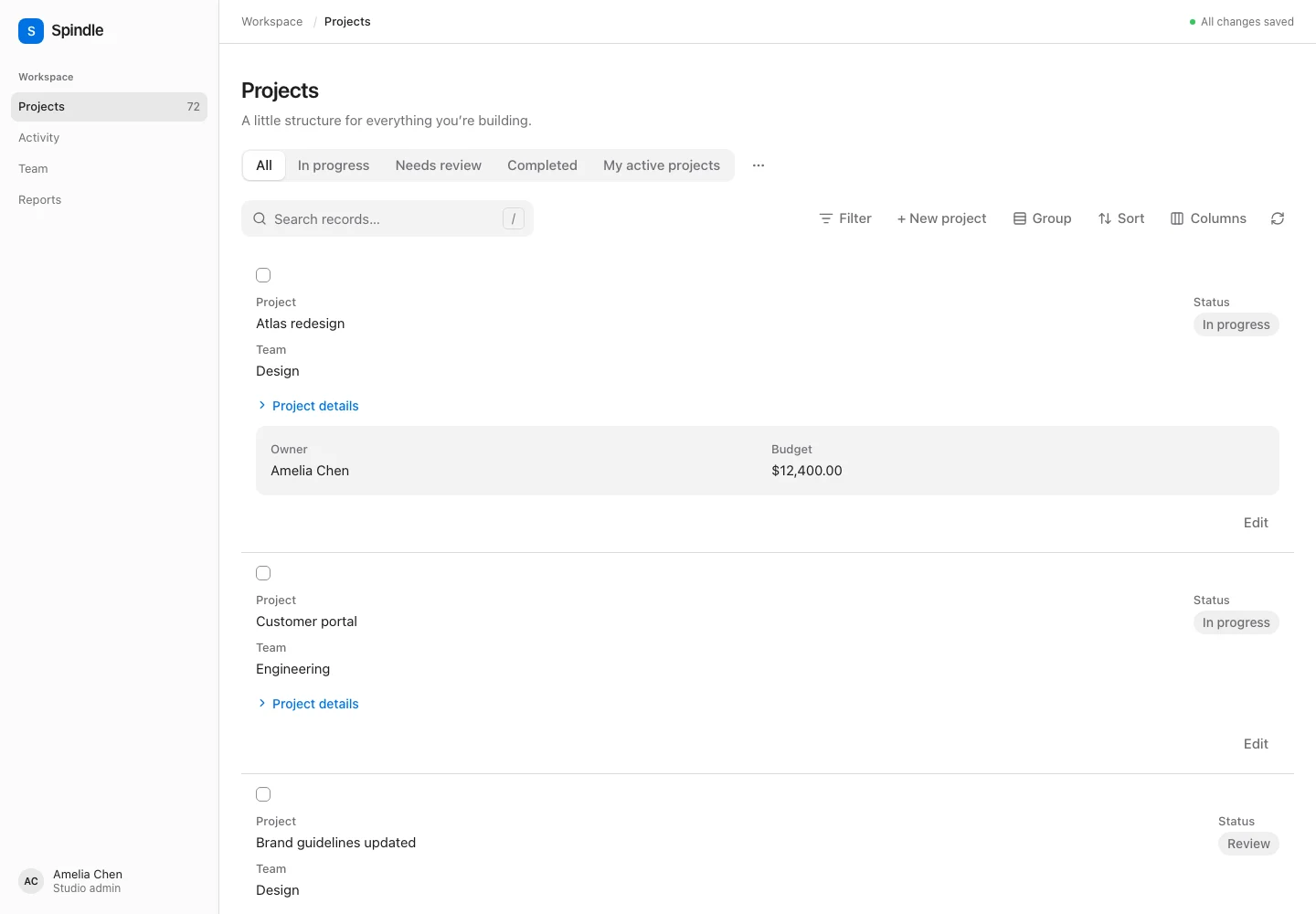
Responsive layouts and detail panels
Use layout components from Spindle\Table\Columns\Layout inside columns():
->columns([
    Split::make([
        ImageColumn::make('avatar')->circular()->grow(false),
        Stack::make([
            TextColumn::make('name')->searchable()->sortable(),
            TextColumn::make('email')->hiddenByDefault(),
        ]),
    ])->from('md'),
    Panel::make([
        Grid::make(['default' => 1, 'lg' => 2])->schema([
            TextColumn::make('company'),
            TextColumn::make('phone'),
        ]),
    ])->label('Contact details')->collapsed(),
])
Layouts switch the prebuilt renderer to full-width record cards. Combine them with contentGrid(3) for a multi-column card grid. They can nest arbitrarily. Split changes from vertical to horizontal at its from() breakpoint; Stack stays vertical; Grid accepts 1–12 columns at each breakpoint; Panel provides a bordered background. collapsible() initially closes a panel; collapsed(false) initially opens it. Native details controls support keyboard navigation.
Columns and layouts support grow(false), alignment('start'|'center'|'end'|'stretch'), columnSpan(2|'full'|['default' => 1, 'lg' => 2]), visibleFrom() and hiddenFrom(). Layouts also accept space(0..12) in four-pixel increments. Breakpoints are sm 640px, md 768px, lg 1024px, xl 1280px and 2xl 1536px. Responsive visibility affects presentation only; use hidden() on a column to exclude its values from the response.
The headless payload keeps a flat columns list for searching, sorting and visibility, plus the recursive config.columnLayout tree. Column-manager order sorts siblings inside their existing layout containers; it does not move a column into another container. Empty containers are removed when their columns are hidden. Custom layout snippets receive the serialized row, layout descriptor and a children snippet:
View::make('profile')->schema([TextColumn::make('name')]);{#snippet profile(row, layout, children)}
<section aria-label={`Profile ${row.id}`}>
{@render children()}
</section>
{/snippet}
<Table table={projects} prop="projects" layouts={{ profile }} />A custom layout receives only the table’s serialized row, never a raw Eloquent model. Flat tables continue to use semantic table markup and spanning column groups.
Rich text
TextColumn::make('description')->markdown()->wrap();
TextColumn::make('excerpt')->html()->wrap();
TextColumn::make('example')->code('php')->copyable();
ImageColumn::make('members')->state(fn ($record) => $record->members->pluck('avatar_url')->all())
    ->with(['members'])->circular()->stacked()->limit(3)->limitedRemainingText();
HTML and Markdown opt in per column. formatStateUsing() runs first; its result is sanitized too. The renderer consumes the resulting cell.html property. Only text formatting, lists, code, tables and safe links are allowed; scripts, embedded media, event handlers, styles and arbitrary attributes are removed. url() does not wrap a rich-text cell in another link, since rich content may contain links already.
Markdown uses League CommonMark with embedded HTML and unsafe links disabled, followed by Symfony HTML Sanitizer. Parsing is bounded to the first 100 KB of UTF-8 input with a nesting limit of 20. HTML goes through the same sanitizer. Plain and code modes remain escaped text. Code cells optionally include syntax tokens as described below.
Custom frontends may render cell.html from this trusted server serializer. Do not turn raw value or formatted into HTML. The headless formatCell() continues to return plain display text.
Syntax highlighting
TextColumn::make('example')->code('php')->copyable();
TextColumn::make('source')->code(fn ($record) => $record->language);
TextColumn::make('raw')->code(); // Plain, escaped monospace text.
TextColumn::make('settings')
    ->formatStateUsing(fn ($value) => json_encode($value, JSON_PRETTY_PRINT))
    ->code('json');
highlight.php computes tokens on the server using the explicitly chosen language. Use its canonical grammar IDs such as php, javascript, typescript, json, python, sql, css, bash, or xml. Common aliases include html, js, ts, py, sh, shell, yml, md, c, c++, c#, csharp, rb, and rs. Language callbacks receive the record and remain on the server. The column language is explicit; grammars may additionally recognize embedded languages, such as JavaScript inside HTML. No frontend highlighter dependency is added.
The prebuilt renderer includes light/dark token colors and preserves copyable text and limit() formatting. Tokens contain text and allowlisted hljs-* CSS classes, never HTML. Custom renderers can use formatCodeTokens(cell, column, locale?), render each token as escaped text in a span, and provide their own token styles. Fall back to formatCell() when tokens are absent.
Unknown languages and sources larger than spindle-table.highlight_max_bytes fall back to the full escaped text. The default limit is 10,000 UTF-8 bytes; set it to 0 to disable highlighting or up to 100000 to increase it. Output is additionally bounded by token count, nesting, and rendered size. Highlighting falls back whenever parsing cannot preserve the source exactly. Format arrays or objects into strings before calling code().
Identical language/source pairs share a request-scoped cache, bounded to 64 entries and 1 MB of token JSON.. This microbenchmark does not measure database or browser rendering time.
Column manager
Visibility is decided for the whole table, not per column: either every column can be shown and hidden, or none can. Columns are toggleable by default; toggleableColumns(false) turns it off. hiddenByDefault() on a column starts it hidden while columns are toggleable (it is ignored, and the column shown, when they are not).
$table->columns([
        TextColumn::make('name'),
        TextColumn::make('internal_code')->hiddenByDefault(),
    ])
    ->toggleableColumns()        // default; toggleableColumns(false) locks every column visible
    ->columnManagerLayout('modal')
    ->columnManagerColumns(2)
    ->columnManagerWidth(760)
    ->columnManagerMaxHeight(600)
    ->columnManagerResetActionPosition('header')
    ->reorderableColumns()
    ->deferColumnManager();
The column manager supports panel (default), dropdown, modal, and slide-over. It includes local label search, visibility toggles, drag-and-drop reordering, keyboard-accessible move buttons, and reset to the server defaults. columnManagerColumns(1..6) controls its desktop grid; mobile uses a single column. Reset can appear in the header or footer (default).
Changes apply immediately by default. deferColumnManager() stages visibility and order changes until Apply columns, sending both together in one request. Reset changes the draft; Discard restores applied preferences. Closing the manager keeps its draft while the table remains mounted. Applying column preferences does not apply an unrelated filter draft. Saved views and session persistence store applied preferences only.
reorderableColumns(false) disables reordering in the controls and normalizes incoming order to the server definition order. columnManager(false) hides the manager; it does not make declared cell data private. Use server-side hidden() for columns that must not be serialized, and toggleableColumns(false) when every column must remain visible. With nothing to toggle or reorder, the prebuilt UI leaves out the Columns button. Width and height apply to overlays and are bounded to fit the viewport.
A custom Svelte composition can use the exported ColumnManager; other frameworks can use createTableControls() and their own UI.
Actions triggered from cells
Attach an ordinary action to a column. The same frontend actions/onAction handler used by row actions receives its selected record, initial data, and typed submission/cancellation methods:
TextColumn::make('name')->action(
    Action::make('rename')
        ->label('Rename project')
        ->authorize(fn ($record, $user) => $user->can('update', $record))
        ->handler('projectEditor')
        ->data(fn ($record) => ['name' => $record->name])
        ->rules(['name' => ['required', 'string', 'max:100']])
        ->action(fn ($record, $data) => $record->update($data)),
);
Alternatively, ->action('edit') references an action declared in recordActions(). An inline action belongs only to its cell; it does not add another row-action button. Unauthorized/invisible cell actions are omitted from the cell. Server-hidden columns cannot be invoked through the column-action endpoint. The server resolves the current column definition and scoped record, checks action identity and authorization, and validates input on every submission.
The cell payload’s optional action includes column, identifying its origin. Headless renderers call controller.createAction(cell.action, row.id) and use invocation.submit(), or call controller.runColumnAction(column.name, cell.action.name, row.id, data). Custom Svelte snippets can capture the controller and application action handler from their parent.
The prebuilt renderer supports these triggers in tables, cards, and nested column layouts. Editable cells retain their edit controls. Rich HTML/code cells show a separate action button to avoid nesting links or other interactive content inside a button. A cell URL takes precedence over a trigger unless the application intercepts its action through a frontend handler.
Use Column::openUrlInNewTab() for cell links, Action::openUrlInNewTab() for action links, and Table::openRecordUrlInNewTab() for record links. The Svelte renderer uses _blank and rel="noopener noreferrer"; headless renderers read column/action meta.newTab and table config.recordUrlNewTab.